setCustomVariables
// setCustomVariables Method
monetateQ.push(['setCustomVariables', [
  {
    name: 'test1',
    value: '1'
  },
  {
    name: 'test2',
    value: 'test2'
  }
]]);
The setCustomVariables method provides a way to indicate that a custom variable is present on your site. This method takes an array of JavaScript objects, each with the key's name and value, both of which can be a string or a number.
You must implement this method to use custom variable options available for WHO Landing targets, recommendations filters, and action conditions.
For example, you can track membership levels for individual customers. You can report a custom variable called membership and return the membership level for a site visitor.
For example, your site has a rewards program that allows members to earn badges. You know that a customer currently logged into the site has earned Penguin status and that they're four stars away from Pelican status. You can use setCustomVariables to account for this data.
Monetate Inspector View
The Monetate Inspector tool reports custom variables identified by setCustomVariables on the Track tab. This screenshot shows that it has found two custom variables and their associated values: rewardStatus and starsNeededForPromotion.
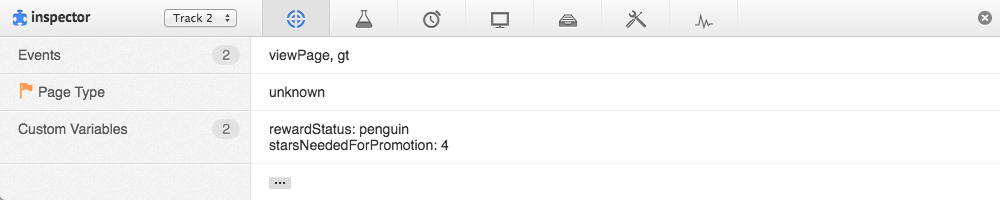
This code example contains the method in use that results in the Monetate Inspector results shown in the previous screenshot.
// setCustomVariables Example
window.monetateQ = window.monetateQ || [];
monetateQ.push(['setCustomVariables', [
  {
    name: 'rewardStatus',
    value: 'penguin'
  },
  {
    name: 'starsNeededForPromotion',
    value: '4'
  }
]]);
window.monetateQ.push([
  "trackData"
]);